Team Members Management
Team members are the people who work in your Whautomate account: front desk staff who answer chats, team members who take appointments, and managers who look after invoices and reports. Each one has their own login, a role that decides what they can do, and one or more workspaces they work in.
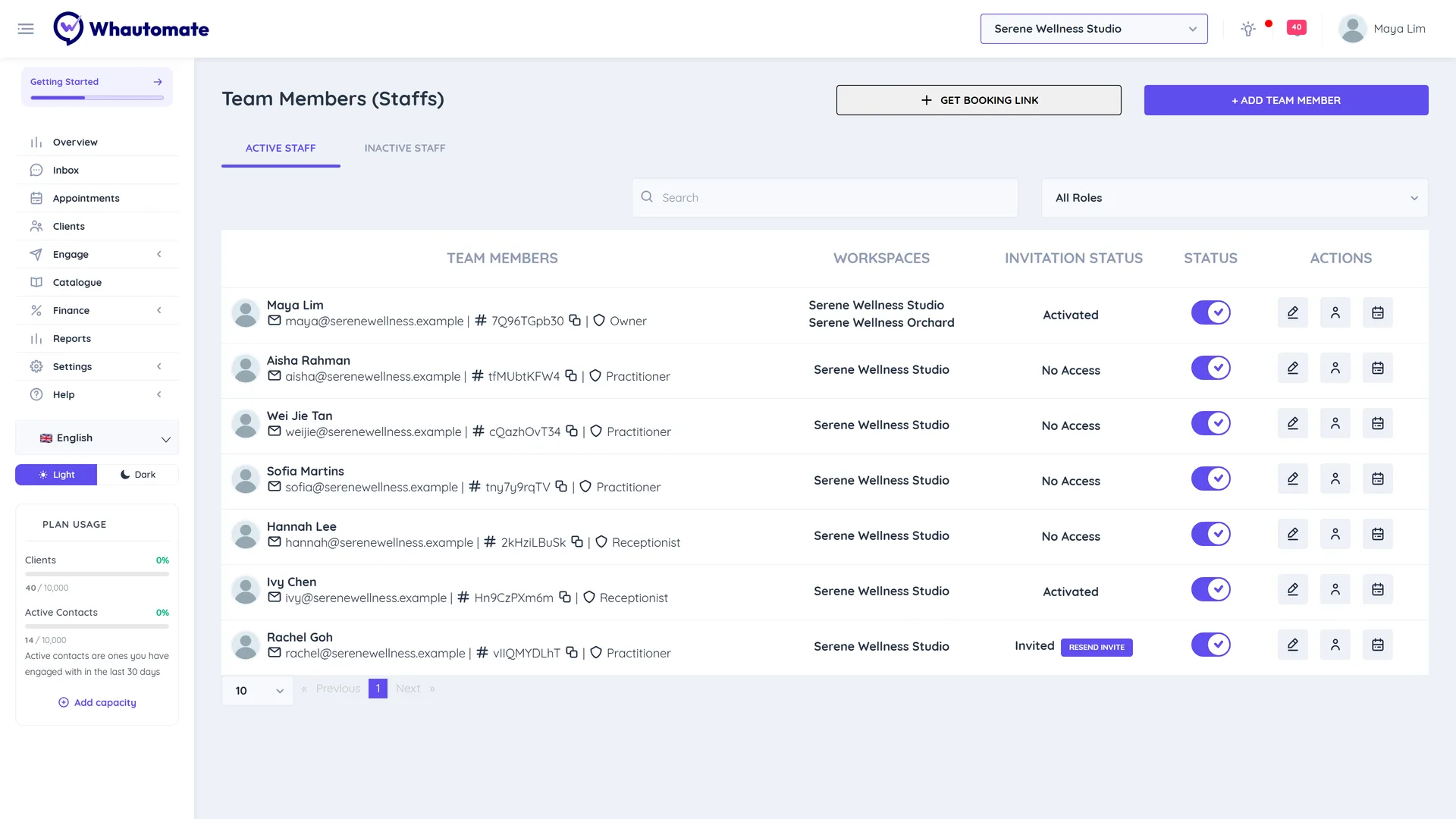
Go to Settings > Team Members to see your team. The page has two tabs, Active Staff and Inactive Staff, and you can search by name or filter by role.
In this section
Who can manage the team
Only the account Owner and Administrators can add team members, change roles and permissions, and switch members on or off. Other team members can open the Team Members page to edit their own profile and availability.
Seats
Each active team member uses one seat. Your plan includes a number of users, and you can buy more as an Extra user add-on. See Whautomate Add-ons.
- Inactive team members do not use a seat.
- When every seat is used, adding or reactivating a member shows You have reached maximum number of team members. Please contact admin to upgrade your license. Deactivate someone or add seats first.
- If your plan's seat count goes down, Whautomate switches off the extra members automatically: the owner is never switched off, administrators go last, and otherwise the newest members go first. When seats become available again, those members are switched back on, oldest first. Nothing is deleted.
Invitation status
The INVITATION STATUS column shows where each member is with their login:
| Status | Meaning |
|---|---|
| Invited | The invitation email was sent but the member has not set a password yet. Owners and administrators see Resend Invite next to it. |
| Activated | The member set a password and can log in. |
| No Access | The member was added with No Application Access. They appear in your calendar and lists but cannot log in. |
Each team member's profile and availability
From the ACTIONS column you can also:
- Edit Team Member: change name, role, permissions and workspaces (owners and administrators).
- Edit Profile: the team member's public profile and services, used for bookings. See Setup Team Member Profile.
- Edit Availability: their working hours for appointments.
Team members with the Practitioner/Staff role see these buttons only for themselves.