Manage Subscription
Your subscription decides which features your team can use and how many people, contacts and locations your account includes. You manage it from Settings > Account & Team > Manage Subscription.
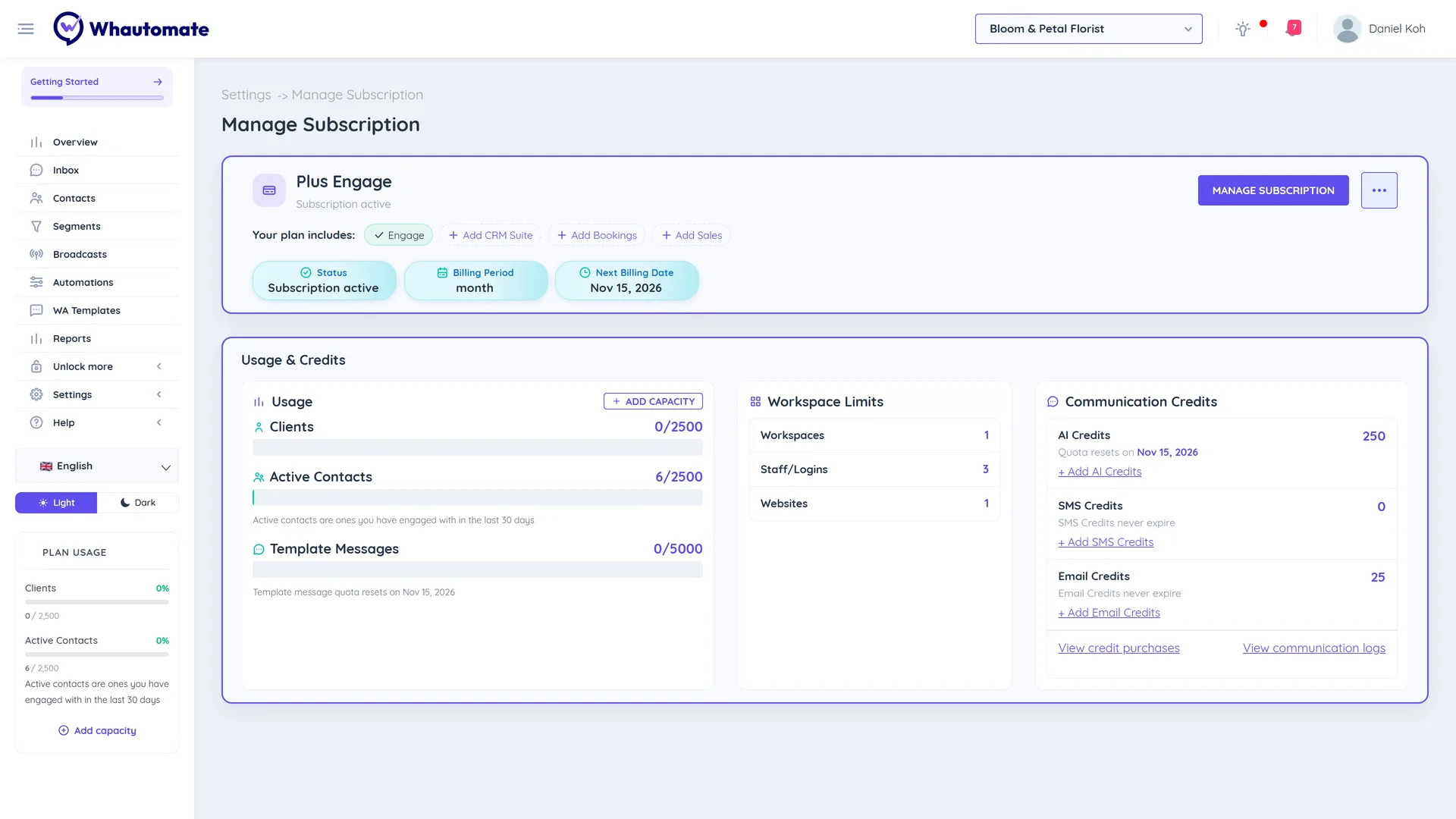
The Manage Subscription page shows:
- Your plan name and status, and the billing period, next billing date and trial end date.
- Your plan includes: the modules in your plan.
- Usage & Credits: your clients, active contacts and template messages, your workspace limits (workspaces, staff logins and websites) and your communication credits.
Permissions
Only the account Owner and Administrators can see and change the subscription.
Choose Your PlanEditions (Engage and Complete), sizes (Plus, Scale and Supreme), the free trial and older plans.Plan ModulesWhat Engage, CRM Suite, Bookings and Sales unlock, and what you see when something is locked.Upgrade SubscriptionChoose a plan after your trial, change edition or size, or add a module.Whautomate Add-onsExtra users, locations, websites, active contacts, template messages and AI credits.Update Payment MethodAdd, update or remove the card used for your subscription.Subscription CancelationsCancel your subscription, or undo a scheduled cancellation.
For prices in your country, see our pricing page.