Order Updates
Order Updates runs when an order in your Whautomate store is created or its status changes, for example Paid, Shipping, Delivered or Cancelled. Use it to keep customers informed and to ask for a review once the order is complete.
Conditions
Conditions are optional. Click Add Condition, then pick a Field, an Operator and a value. Choose All (AND) or Any (OR) under Condition Type to decide whether every condition or just one must match.
| Condition | Operators | Values |
|---|---|---|
| Contact Group | is part of all, is part of any, is not part of all | Your contact groups |
| Order Status | equals, not equals | Pending, Paid, Processing, Shipping, Delivered, Completed, Partially Delivered, Partially Completed, Cancelled, Refunded |
| Ordered From | equals, not equals | Admin Portal, Online Store, WhatsApp, Telegram, API |
| Client Tags | includes any, does not include all, is part of all, is part of any, is not part of all | Your client tags |
| Contact Tags | includes any, does not include all, is part of all, is part of any, is not part of all | Your contact tags |
| Contact Stage | equals, not equals | Subscriber, Lead, Engaged, Marketing qualified lead (MQL), Sales qualified lead (SQL), Opportunity, Follow-up Required, Customer, Evangelist, Other, Lost, Inactive |
| Client Receives Updates On | is part of all, is part of any, is not part of all | WhatsApp, Telegram, SMS, Email, Not set |
Ordered From tells where the order was placed: Admin Portal, Online Store, WhatsApp, Telegram (the Telegram mini app) or API. For example, add Ordered From equals Telegram and a Send Telegram Text Message action to confirm mini app orders in the Telegram chat; {{order.orderItems}} lists what was ordered.
Actions
Click Add Action and choose from Select Action. Actions run in order; use the arrows to reorder them. To delay an action, click Add wait time (or Add wait & Schedule time on template and email actions). Wait times count from the trigger event, not from the previous action.
Every action on this trigger can wait minutes to months.
| Action | What it does |
|---|---|
| Send a WhatsApp Template Message | Sends an approved WhatsApp template. Works outside the 24-hour session, so use it for reminders, follow-ups and anything sent later. |
| Send Customer Satisfaction Survey (CSAT) | Sends a customer satisfaction (CSAT) survey. |
| Add the Contact to Group | Adds the contact to a contact group, which you can check in later conditions. |
| Remove the Contact from Group | Removes the contact from a contact group, for example so a rule does not run twice. |
| Add Client Tags | Adds tags to the client record. Needs CRM Suite. |
| Remove Client Tags | Removes tags from the client record. Needs CRM Suite. |
| Add Contact Tags | Adds tags to the contact. |
| Remove Contact Tags | Removes tags from the contact. |
| Update Contact Stage | Moves the contact to a stage, such as Lead or Customer. |
| Assign a Form and Request Form to Be Filled | Assigns a form to the client and sends a WhatsApp message asking them to fill it in. Needs CRM Suite. |
| Notify Staff via WhatsApp | Sends a WhatsApp template message to the team members you choose. |
| Send Email | Sends an email to the client, team members or a custom list. Marketing emails need CRM Suite; Transactional emails do not. |
| Send Telegram Text Message | Sends a Telegram text reply. |
| Send Telegram Template Message | Sends a Telegram message with buttons. |
| Send Telegram Media | Sends an image, video or file on Telegram. |
| Send Telegram Audio | Sends an audio message on Telegram. |
| Send SMS | Sends an SMS through your SMS provider (Integrations > SMS). In an SMS conversation it goes to that contact, otherwise to the client's phone number. Skipped when no provider is connected, the client has no phone number or the number opted out (STOP). |
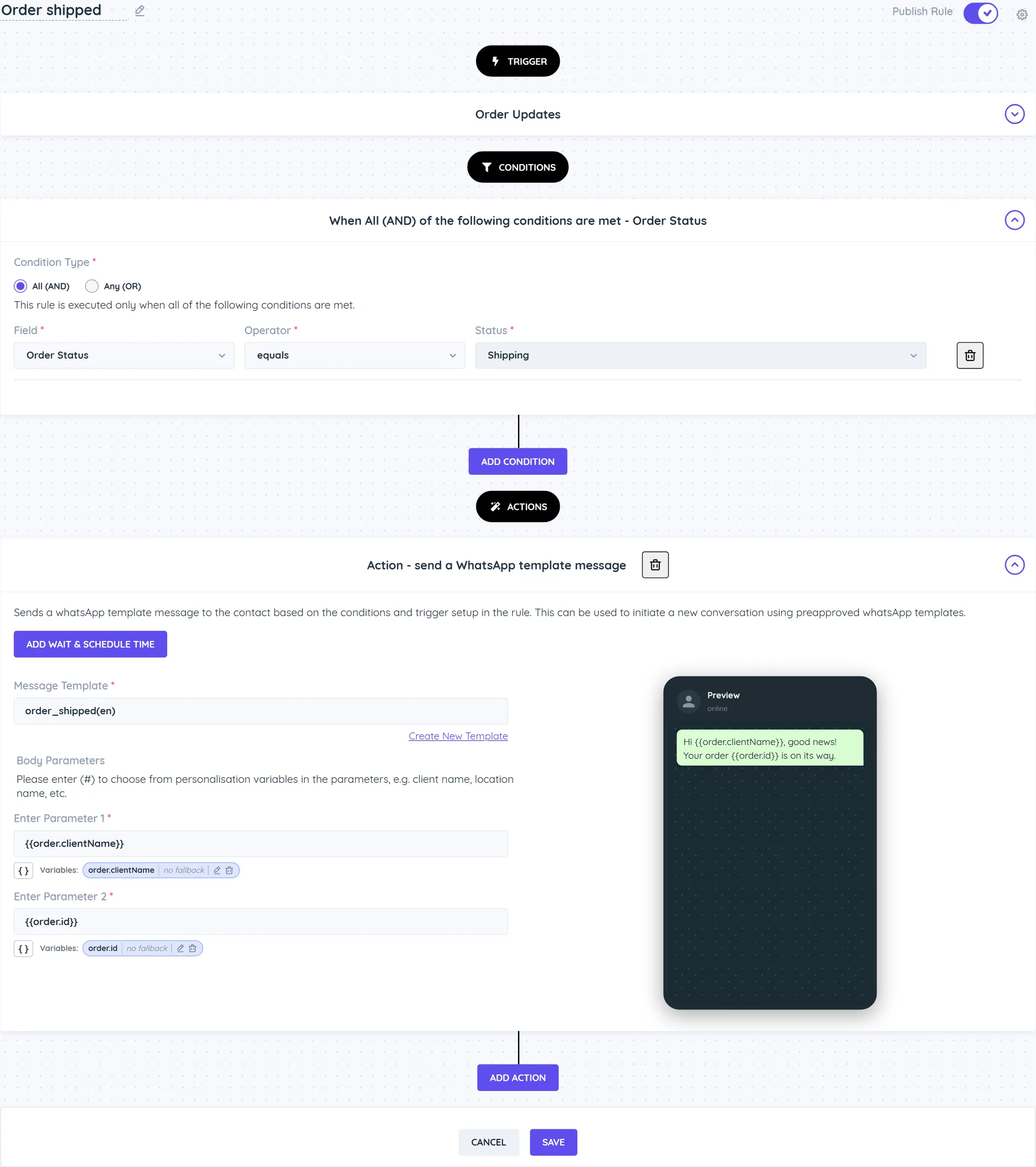
Example
Tell customers their order is on its way
- Create a rule with the Order Updates trigger.
- Add the condition Order Status equals Shipping.
- Add the action Send a WhatsApp Template Message with your shipping update template.
Good to know
- The Automate Order Updates, Automate Reviews - Order Completion and Automate Surveys - Order Completion templates are ready-made versions.
- For Shopify or WooCommerce orders, use the Shopify and WooCommerce triggers.
- Besides WhatsApp templates and email, client rules can reach the client on Telegram (Send Telegram Text Message, Send Telegram Template Message, Send Telegram Media, Send Telegram Audio) and by SMS (Send SMS). Telegram goes to the chat linked to the client, or the chat whose shared phone number is the client's; SMS goes through your own SMS provider to the client's phone number. When there is no chat, no provider, no phone number or the number replied STOP, the action is skipped and the log says "Skipped:". Use Client Receives Updates On to send each client the update on the channel they chose: one rule per channel, each with its own condition (Not set matches clients who made no choice).