Birthday Wishes Campaign
A birthday campaign sends each client a personal message on their birthday, on WhatsApp, by email or both. You set it up once and it runs every day for everyone whose birthday is coming up. Add a small gift, such as a discount code, to bring clients back.
Before you start
- Make sure your clients have a date of birth on their client record. Clients without one are skipped.
- Create a WhatsApp birthday template and wait for Meta to approve it. See WhatsApp Message Templates. A birthday message usually starts a new conversation, so it has to be a template.
- For email, set up an email sending domain.
Set it up
- Go to Engage > Automations and click Add Rule.
- Set the filter to Client and click Install Rule on Automate Birthday wishes Campaign.
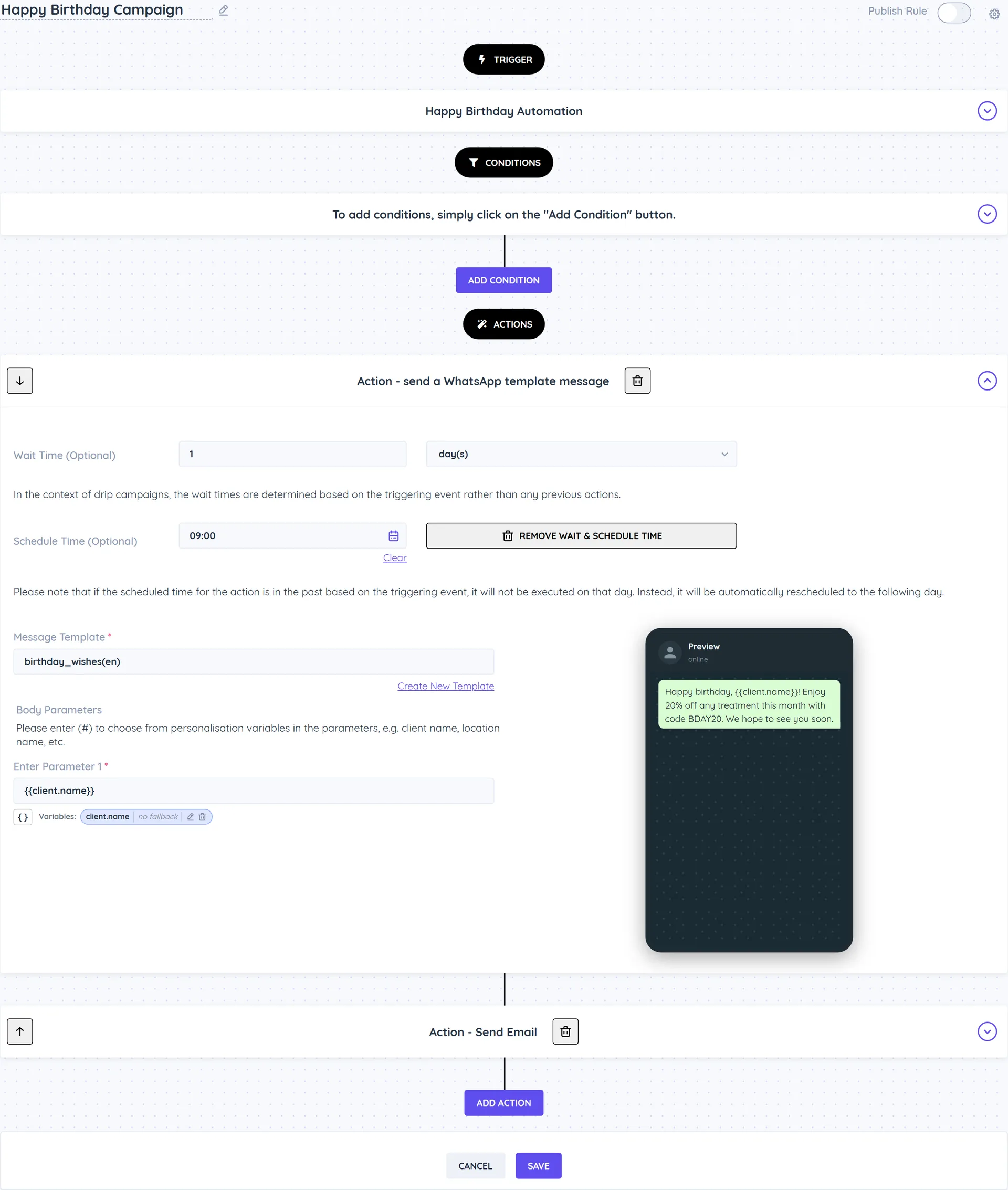
- The Happy Birthday Campaign rule opens. It uses the Happy Birthday Automation trigger and has two actions, each set to wait 1 day and send at 9:00:
- Send a WhatsApp Template Message: under Message Template, pick your birthday template and fill in the Body Parameters. Type # to insert the client's name.
- Send Email: write the Subject and message, or delete this action if you only want WhatsApp.
- Optionally add conditions, for example Client Tags does not include all "unsubscribe", or Client Age for milestone birthdays.
- Turn on Publish Rule and click Save. The template is installed switched off, so this step matters.
When messages are sent
The birthday check runs once a day and picks clients whose birthday is the next day. The 1 day wait then delivers your message on the birthday itself, at the Schedule Time (Optional) you set (9:00 by default).
To send earlier, for example a voucher a few days before, change the number of days in Automation Schedule.
Ideas
- Add Add Client Tags ("Birthday offer sent") and use the tag in a segment to see who redeemed it.
- Add a second Send a WhatsApp Template Message with a wait of 7 days to remind clients their offer is about to expire.
- Use Notify Staff via WhatsApp to let the team member know, so they can say happy birthday in person.