Triggers
A trigger is the event that starts an automation rule, such as a message arriving, a contact being tagged or an appointment being booked. Every rule has exactly one trigger. The trigger decides which conditions and actions you can choose, so pick it first.
You choose the trigger in the Trigger section when you create a rule. Triggers that need a module your plan does not include stay in the list with a lock and Needs the ... add-on, and cannot be picked. A saved rule whose trigger is no longer in your plan shows This trigger needs the ... add-on, so this rule will not run on your current plan.
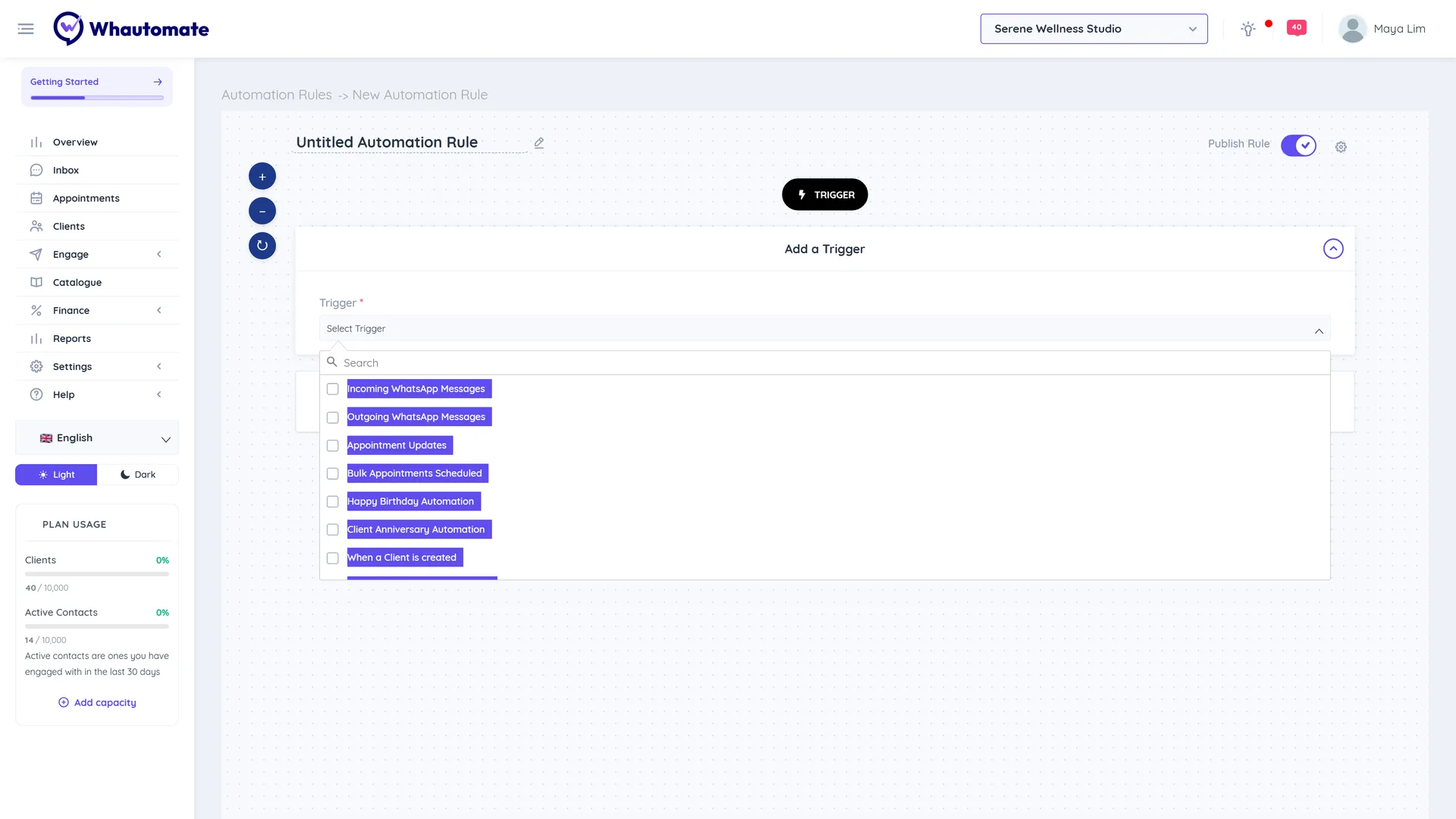
The Trigger list groups related triggers under headings: Messaging, Bookings, Sales and payments, E-commerce, Clients and contacts, Forms and Other. Type in the list to search.
Messages (Engage)
Message triggers run on every message in or out of a channel. They power chatbots, keyword replies, AI replies and handover to your team.
| Trigger | Runs when |
|---|---|
| Incoming WhatsApp Messages | A contact sends you a WhatsApp message |
| Outgoing WhatsApp Messages | A WhatsApp message is sent to a contact (not broadcasts) |
| Incoming Messenger Messages | Someone messages your Facebook Page |
| Outgoing Messenger Messages | A Messenger message is sent |
| Incoming Instagram Messages | Someone sends your Instagram account a direct message |
| Outgoing Instagram Messages | An Instagram message is sent |
| Incoming Telegram Messages | Someone messages your Telegram bot |
| Outgoing Telegram Messages | A Telegram message is sent |
| Telegram chat linking | A step of linking a Telegram chat to a client: shared phone, profile picked, client link opened |
| Incoming Website Messages | A visitor writes in your website live chat |
| Outgoing Website Messages | A live chat message is sent |
| Incoming TikTok Messages | Someone sends your TikTok account a direct message |
| Outgoing TikTok Messages | A TikTok message is sent |
| Incoming SMS Messages | A customer texts your two-way SMS number |
| Outgoing SMS Messages | An SMS is sent from your two-way SMS number |
Contacts (Engage)
| Trigger | Runs when |
|---|---|
| When a Contact is created | A new contact is created, usually on their first message |
| When a Contact is added to a Tag | A tag is added to a contact |
| When a Contact is removed from a Tag | A tag is removed from a contact |
| When a Contact Status Changes | A conversation is opened, closed or unassigned |
Clients and forms (CRM Suite)
| Trigger | Runs when |
|---|---|
| When a Client is created | A new client record is added |
| When a Client is added to a Tag | A tag is added to a client |
| When a Client is removed from a Tag | A tag is removed from a client |
| Happy Birthday Automation | A client's birthday is coming up (checked daily) |
| Client Anniversary Automation | A client's anniversary with you is coming up (checked daily) |
| When a Client is assigned a Form | A form is assigned to a client |
| When a Client Completes a Form | A client submits a form |
| When someone Completes an anonymous Form | Someone submits a public form not linked to a client |
| When a WhatsApp Flow form is submitted | A contact submits a WhatsApp Flow form built in Forms |
| When a Form is paid by a Client | A client pays on a payment form (also needs Sales) |
Appointments and classes (Bookings)
| Trigger | Runs when |
|---|---|
| Appointment Updates | An appointment is created, changes status or is rescheduled |
| Bulk Appointments Scheduled | Several appointments are scheduled for a client in one go |
| Class Participant Updates | A class booking is added or changes status |
| Bulk Classes Assigned for Participant | A participant is booked into several classes at once |
| Bulk Classes Cancelled for Participant | Several class bookings are cancelled at once |
Sales and store (Sales)
| Trigger | Runs when |
|---|---|
| Order Updates | A store order is created or changes status |
| Invoice Updates | An invoice is created or changes status |
| When a Payment is Completed or Recorded | A client pays online or a payment is recorded |
| Subscription Updates | A client membership is created or changes status |
| New Credits Assigned | New credits are assigned to a client |
| Credits Usage Updates | Credits are used, expire or are updated |
| Loyalty Point Transaction Updates | Loyalty points are added, redeemed or revoked |
| Shopify - Abandoned Cart | A Shopify checkout is abandoned |
| Shopify - Order Created | A Shopify order is placed |
| Shopify - Order Fulfilled | A Shopify order is fulfilled |
| Shopify - Order Cancelled | A Shopify order is cancelled |
| WooCommerce - Abandoned Cart | A WooCommerce checkout is abandoned |
| WooCommerce - Order Status Changes | A WooCommerce order changes status |
Client, booking and sales triggers can message the client on WhatsApp, by email, on Telegram (the chat linked to the client) and by SMS (through your SMS provider). The Client Receives Updates On condition sends each client the update on the channel they chose.
Shopify and WooCommerce rules are created and listed on their integration pages (Integrations > Shopify or WooCommerce), not on the Automations page.