WhatsApp Business API Account Disabled? Here’s How to Recover It
When Meta disables your WhatsApp account, Whautomate shows WhatsApp account disabled by Meta on the WhatsApp integration page and wherever you send WhatsApp messages. Broadcasts, automations and reminders are paused until Meta reinstates the account, and broadcasts cannot be scheduled. A restriction (WhatsApp messaging restricted by Meta) is temporary and lifts on its own on the date shown. Click Open WhatsApp Manager on the alert to start.
Has your WhatsApp Business (Cloud API) account been disabled?
Is your phone number showing a “Banned” or “Disabled” status?
Don’t worry. While this can disrupt your business communication, some account restrictions can be reviewed and reversed if the underlying issue is resolved correctly.
This guide explains:
- The most common reasons WhatsApp Business API accounts get disabled
- How to request an account review through WhatsApp Manager
- Best practices to reduce the risk of future restrictions or bans
📘 Help guide: Essential Tips to Avoid WhatsApp Business Account/API Restrictions & Bans
📘 Detailed Blog Article:
Top Reasons Why WhatsApp Accounts Get Banned and How to Avoid Them
How to Recover a Banned WhatsApp Business API Account
Before proceeding, it’s important to set the right expectations.
- Some bans are reversible once compliance issues are fixed
- Some bans are permanent, especially in cases of repeated violations or spam reports
The key is to identify the reason for the restriction, take corrective action, and then request a review.
Step 1: Check the Account Disabled Notice in WhatsApp Manager
- Log in to your Facebook account and go to the WhatsApp Manager
- Look for the disabled alert at the top of the page, for example “Your business has been disabled”
- Click “See details in Business Support Home” to open the Account Review page
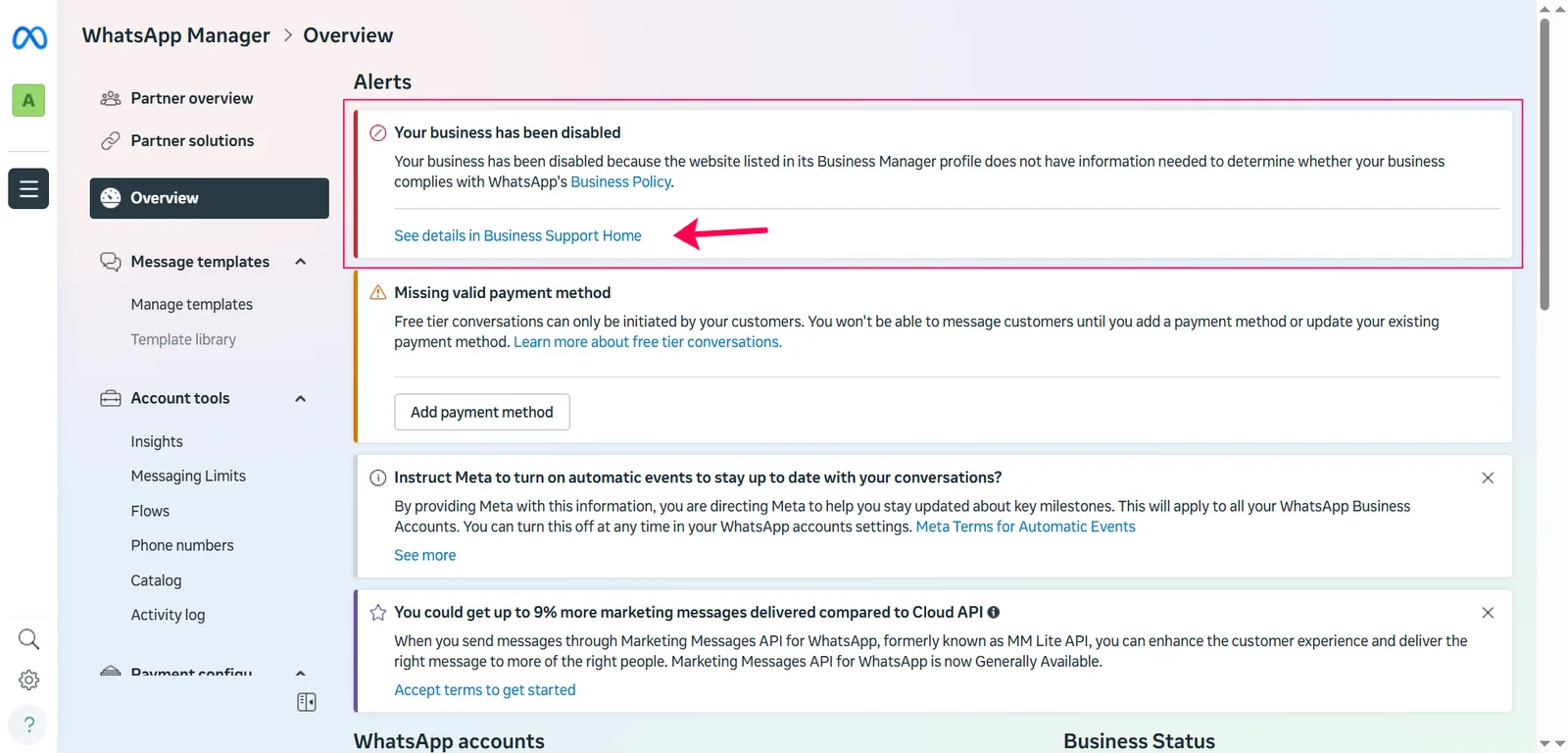
On the review page, you’ll see the exact reason for the restriction under the Disabled status.
Common Reasons for Account Disabling
1. Website Issues
If the restriction is related to your website:
- Ensure the submitted website URL is correct and accessible
- The website should clearly represent your business
- Avoid broken links, placeholder pages, or missing business details
2. Spam Reports
If the reason shown is “SPAM”, it means:
- Multiple users reported your messages in a short time
- Messaging frequency, consent, or content may have violated user expectations
Spam-related bans are harder to reverse, but you can still request a review if you’ve corrected the issue.
3. Business Policy Violations
If WhatsApp flags a policy violation, it usually relates to:
- Restricted or prohibited business categories
- Non-compliant message content
- Improper opt-in or consent practices
Before requesting a review:
- Carefully review WhatsApp Business Policies
- Remove or update any restricted content
- Ensure your messaging and opt-in flow are compliant
Step 2: Request an Account Review
- On the Account Review page, you will see the specific reason for the restriction
- For example, my account was disabled because the website listed in the Business Manager profile lacked the necessary information to confirm that my business complies with our Business Policy.
- I have now updated the missing business information and am ready to request a review.
- Please click on "Request review".
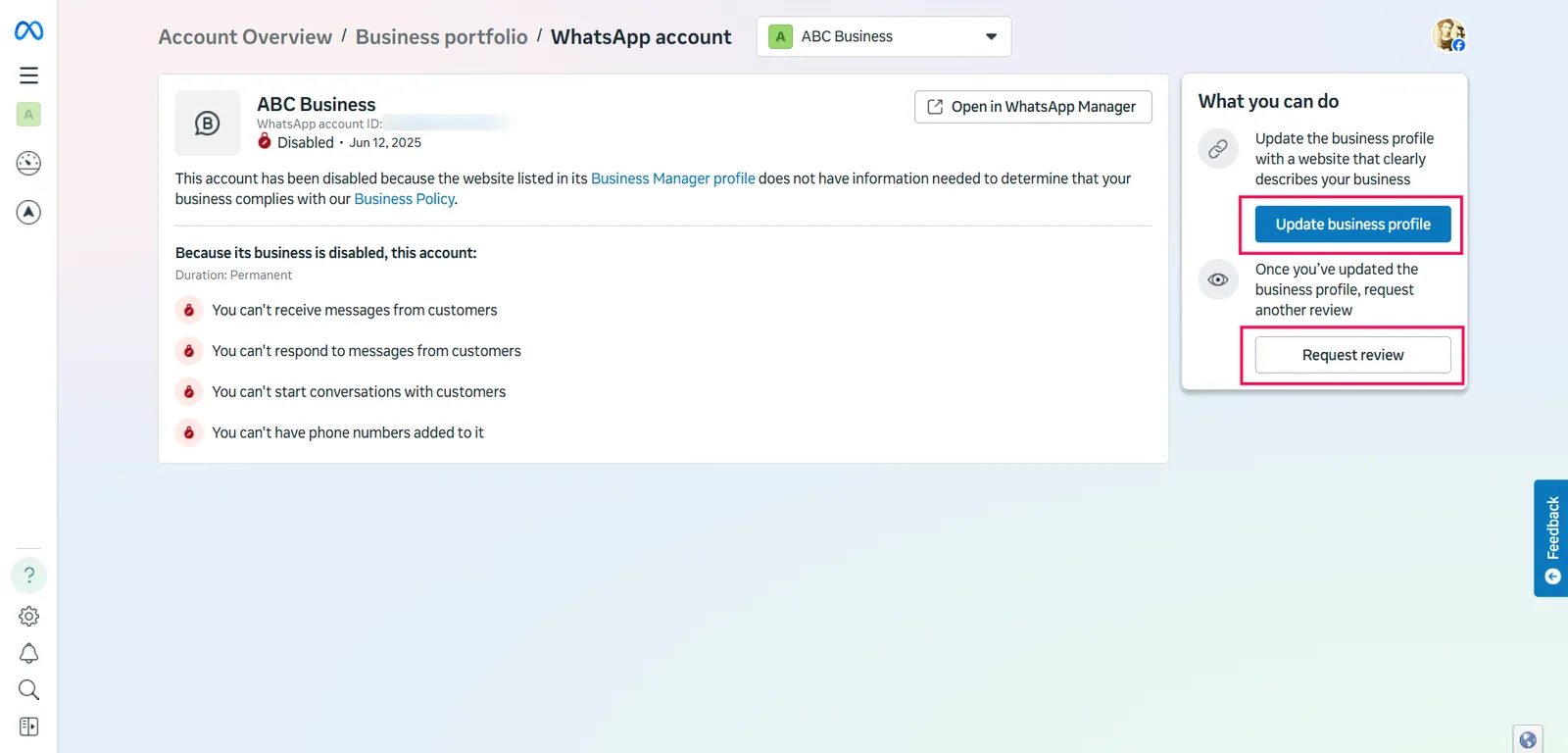
In the review pop-up, submit a short, clear explanation covering:
- The reason shown for the restriction
- What changes have you made to fix the issue
- Any supporting details (updated website, opt-in proof, etc.)
- Click the "Submit"
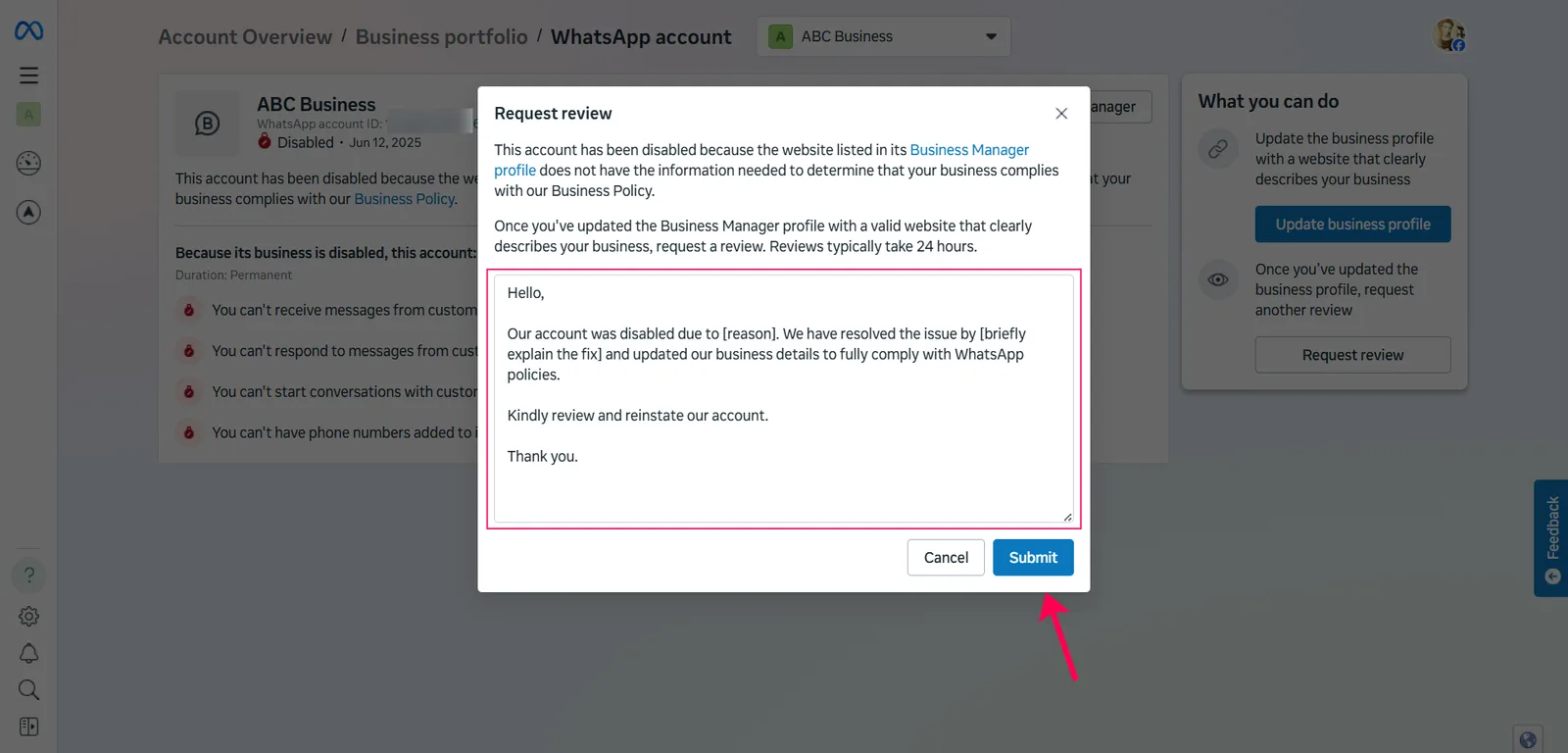
Sample Review Message:
Hello,
Our account was disabled due to [reason]. We have resolved the issue by [briefly explain the fix] and updated our business details to fully comply with WhatsApp policies.
Kindly review and reinstate our account.
Thank you.
What Happens After You Submit the Review?
- Reviews are often processed quickly, sometimes within a few hours
- If more information is required, WhatsApp may request additional details
- If your request is declined, fix any remaining issues and submit another review with updated information
When Recovery Is Not Possible
If:
- You do not see the “Request Review” button, or
- The button is disabled
⚠ This usually indicates a permanent ban.
In such cases:
- The phone number cannot be reinstated
- You’ll need to start with a new phone number and create a new WhatsApp Business API account
Need Help?
If you need guidance during the recovery process, you can contact the Whautomate Support Team at:
Please note: If WhatsApp has marked the ban as permanent, it cannot be reversed by Whautomate or any third party.