Clients Report
The Clients report shows how your client base is growing and where clients come from. Use it to see whether a marketing push brought in new clients, which referral sources work best, and who your most valuable clients are.
The report also needs Bookings or Sales, because it ranks clients by what they spent.
Before you start
- You need access to Reports (Owner, Administrator or Accountant/Finance Manager). See Who can see reports.
- Record a referral source on your clients so the referral chart is useful. See Client Details.
Run the report
- In the sidebar, click Reports. Under Customers, click Clients.
- Set the filters:
- Primary Workspace: one or more workspaces, or All Workspaces. A client's primary workspace is the one they belong to.
- Filter by Date: This Month (the default), Last Month, Last 3 Months, Last 6 Months or your own dates.
- Click Run Report.
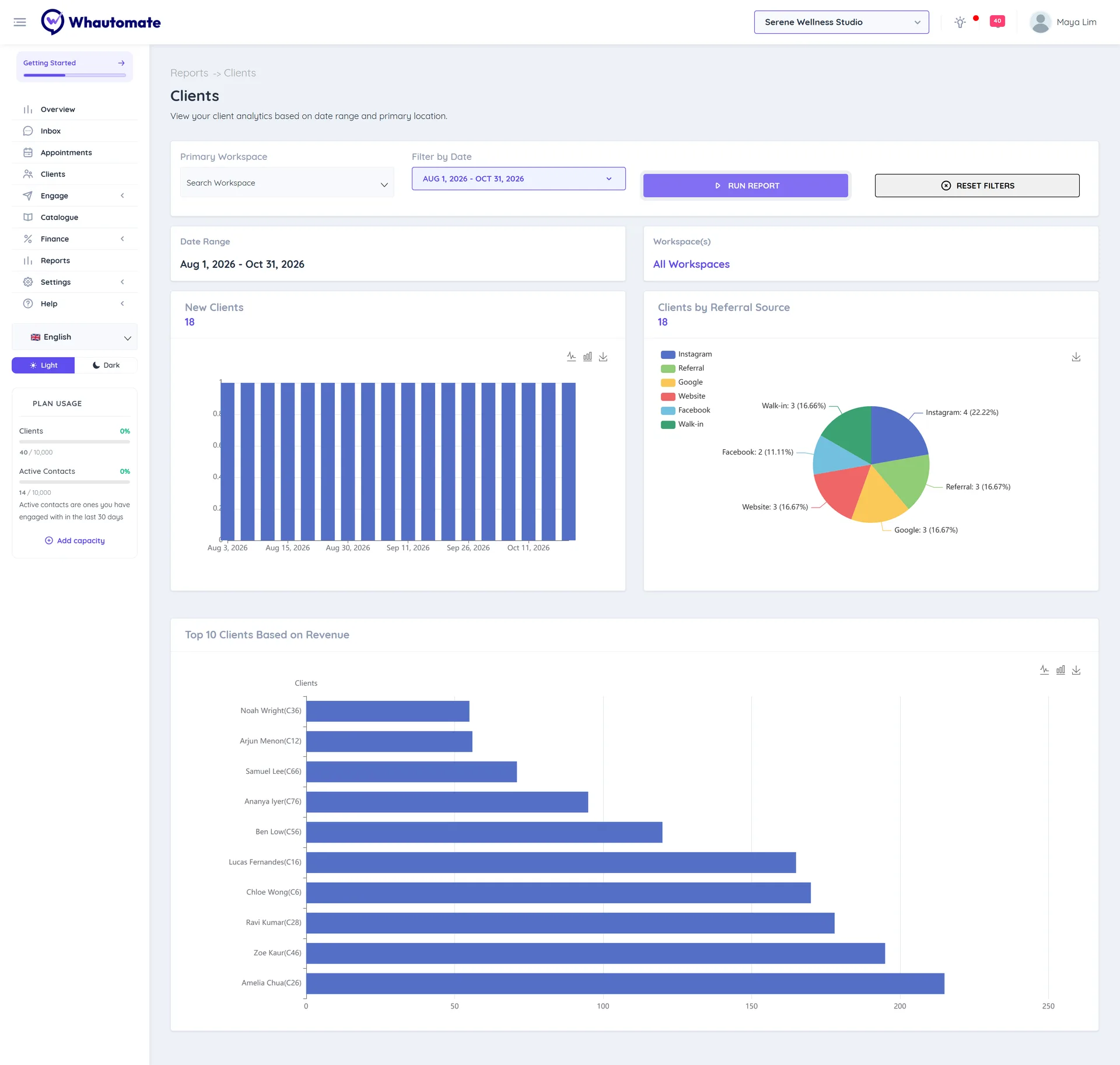
Read the report
- New Clients: how many clients were added over the period.
- Clients by Referral Source: how many new clients came from each source, such as Instagram or a friend.
- Top 10 Clients Based on Revenue: the clients who spent the most in the period.
Each chart has a save button to download it as an image.