Send a WhatsApp Flow from the Inbox
A WhatsApp Flow is a form that opens inside WhatsApp, for example an intake questionnaire, a feedback form or a lead form. You build and publish flows under Engage > Forms & Flows. From the Team Inbox you can send one to the customer you are chatting with: they tap a button, fill in the form without leaving WhatsApp, and their answers come back into the conversation.
Before you start
- Build and publish a WhatsApp Flow under Engage > Forms & Flows. Only published flows can be sent. See Forms.
- The conversation must be on WhatsApp.
- The 24 hour window must be open, which means the customer has messaged you in the last 24 hours. If it has closed, send an approved template first and wait for a reply.
Send a flow
- Open the WhatsApp conversation in the Team Inbox.
- Click + next to the message box and choose WhatsApp Flow.
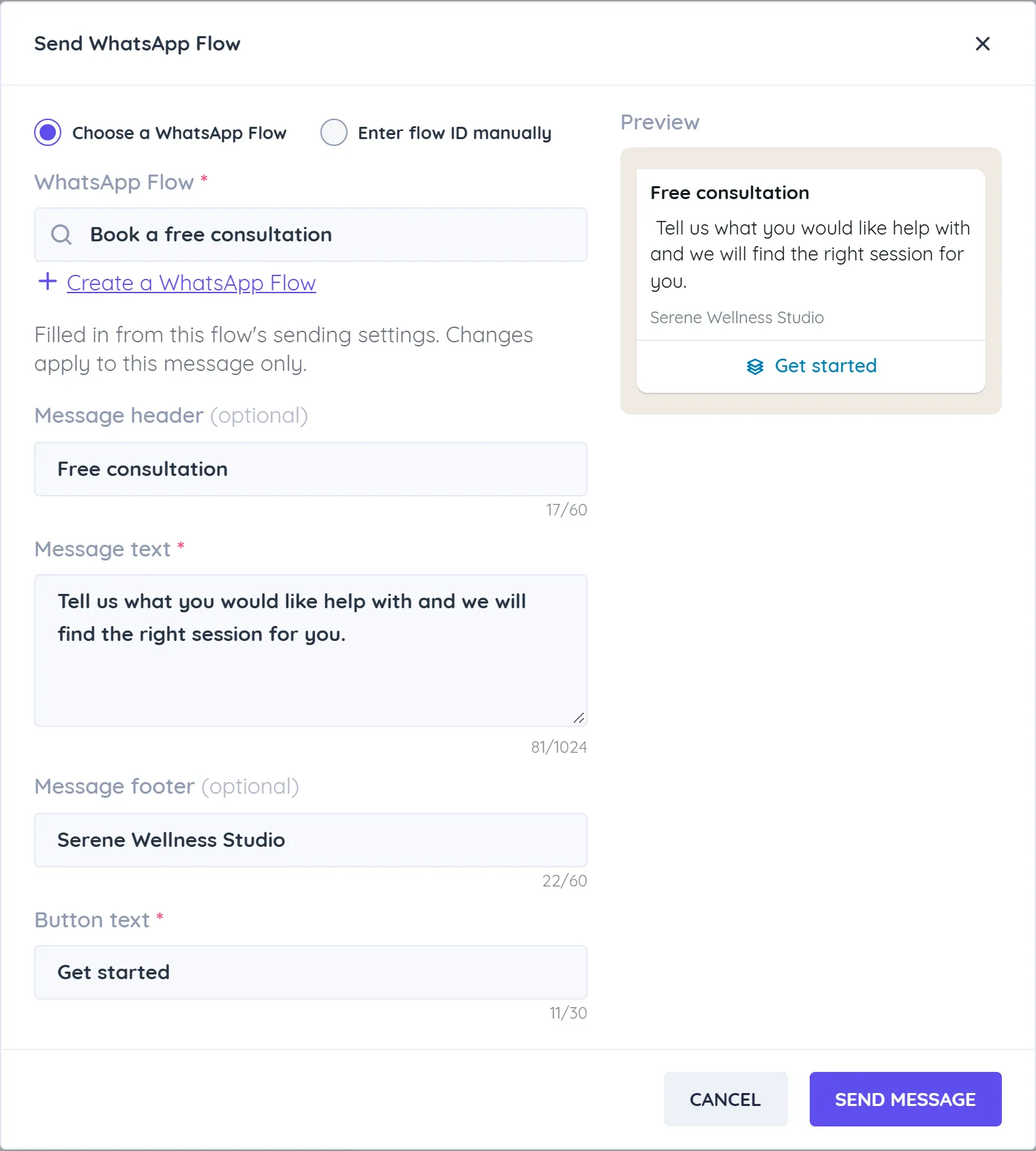
- In Send WhatsApp Flow, choose the flow under WhatsApp Flow. The message fields are filled in from the flow's sending settings.
- Adjust the message if you want. Changes apply to this message only:
- Message header (optional, up to 60 characters)
- Message text (required, up to 1024 characters)
- Message footer (optional, up to 60 characters)
- Button text (required, up to 30 characters), for example Open form
- Check the Preview and click Send Message.
The customer receives your message with a button. When they complete the form, their answers appear in the conversation as a list of questions and answers. Answers to flows built in Forms & Flows are also saved with the flow's responses under Forms & Flows.
Send a flow by ID
To send a flow that was published outside Whautomate, choose Enter flow ID manually, then enter the Flow Id, the Flow Screen ID (the first screen to open) and an optional Flow Token.
From the mobile app
In the mobile team inbox app, open the chat, tap the attach button and choose WhatsApp Flow. Pick the flow (or Enter flow ID), check the message and send.
Troubleshooting
- WhatsApp Flow shows a lock: your plan does not include CRM Suite.
- Publish this WhatsApp Flow before sending it: open the flow under Forms & Flows and publish it. If a flow has unpublished changes, customers get the last published version.
- The option is missing: the 24 hour window is closed (the inbox shows Session expired), or the conversation is not on WhatsApp.