Plan Modules
Whautomate is built from a base, Engage, and three modules you can add: CRM Suite, Bookings and Sales. The Complete plan includes all of them. This page explains what each one unlocks and what happens when something is not in your plan.
What each module unlocks
Engage (every plan)
Engage is always included and never locks:
- Team inbox with assignment and internal notes, for WhatsApp, Instagram, Messenger, TikTok, Telegram, live chat and SMS
- Mobile app for iOS and Android
- WhatsApp, SMS and Telegram broadcasts to contact segments (SMS through your own provider)
- WhatsApp message templates
- Chatbots and automations
- AI chatbot and AI reply assist
- Contacts, tags and segments
- Live chat widget for your website
CRM Suite
Keep every client in one place:
- Client records with full history, notes and custom fields
- Client segments and broadcasts to clients
- Email broadcasts and email campaigns
- Web forms and WhatsApp Flow forms that fill in client records
- Client portal
- One website in Sites
Bookings
Let clients book appointments and classes online or on WhatsApp. CRM Suite comes with it.
- Appointments, group classes and a shared calendar
- Online booking page and WhatsApp booking bot
- Automatic reminders and confirmations
- Online payment when clients book
Sales
Send invoices, collect payments, sell memberships and run an online store. CRM Suite comes with it.
- Invoices, payment links, payments and statements
- Cash payments and refunds
- Online store and orders
- Memberships, plans and session credits
- Expenses, loyalty rewards and inventory
- Shopify and WooCommerce automations
Features shared by modules
| Feature | Opens with |
|---|---|
| Catalogue | Bookings or Sales |
| Payments | Bookings or Sales |
| Payout settings, taxes and coupons | Bookings or Sales |
| Paid forms (forms that collect a payment) | CRM Suite and Sales |
Automations follow the same rules: triggers and actions for clients need CRM Suite, those for appointments and classes need Bookings, and those for invoices, orders, memberships and store integrations need Sales. Message and contact automations work on every plan.
Help pages show what you need
Help pages for module features can show a note like this one, so you know which module the feature needs:
What you see when something is locked
In the sidebar
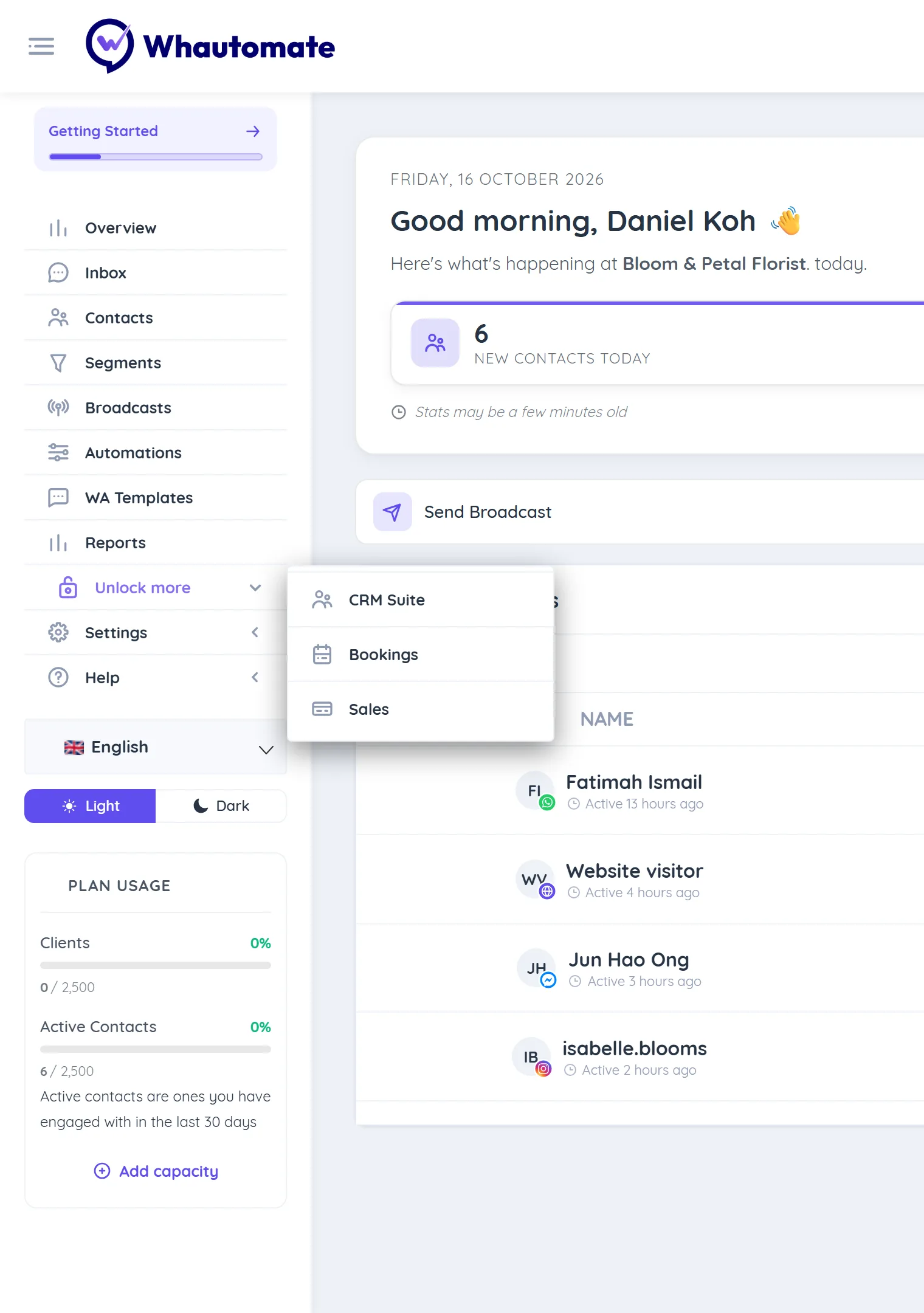
Features that are not in your plan leave their usual place in the sidebar and are grouped under Unlock more, just above Settings. There is one entry for each missing module: CRM Suite, Bookings or Sales.
- On a free trial the group is called Try more, because you can add the module to your trial for free.
- If your plan has no modules at all (Engage only), the items from the Engage group (Contacts, Segments, Broadcasts, Automations and WA Templates) move to the top level of the sidebar, since they are your whole product.
The upgrade page
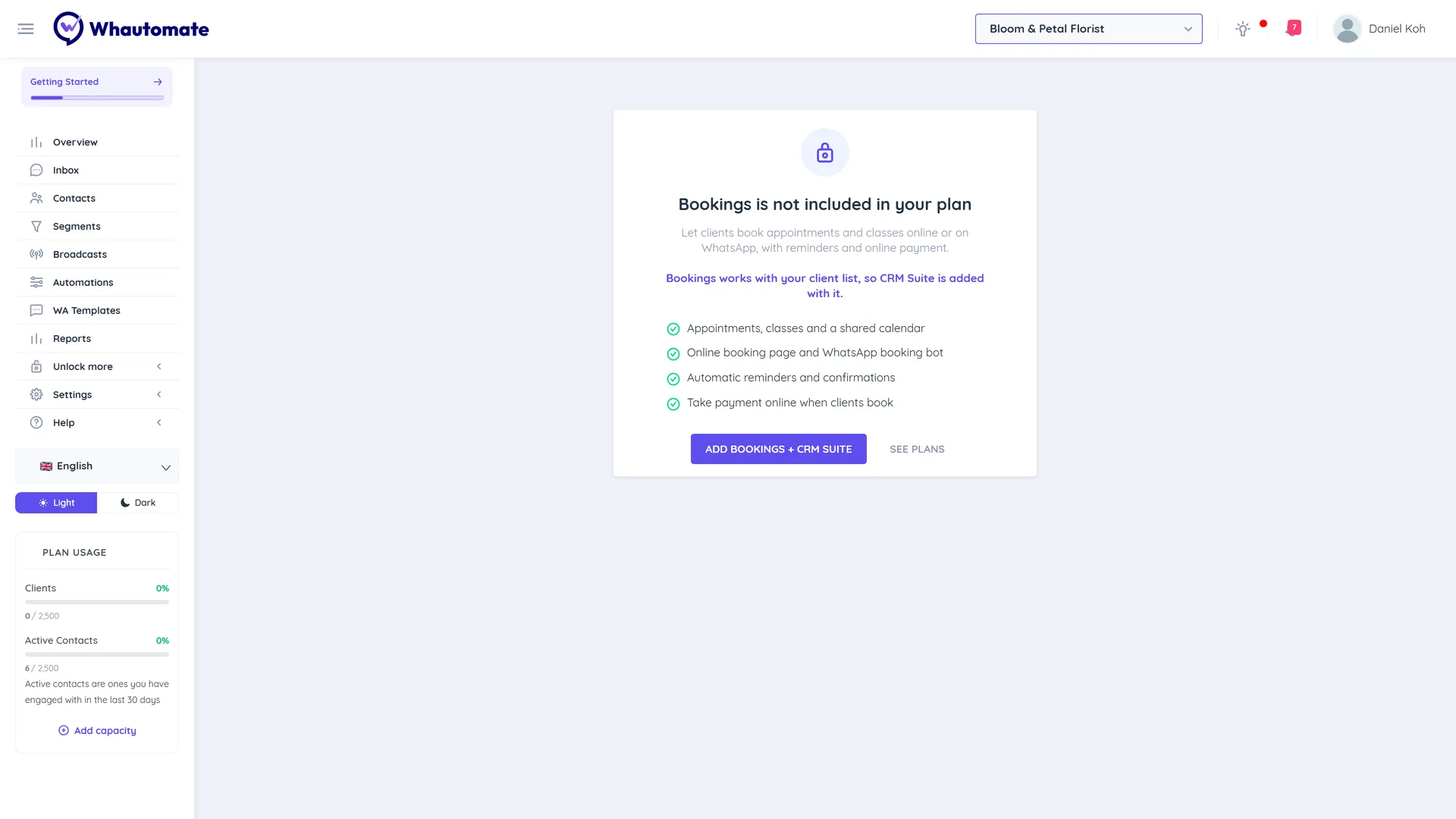
Clicking a locked entry, or a button for a locked action, opens the module's upgrade page. It shows CRM Suite is not included in your plan (or Bookings, Sales), a short description, and what the module includes. Then, depending on your account:
| Your account | What you see |
|---|---|
| Free trial, Owner or Administrator | Try Bookings free and the button Add Bookings to my trial. The module is free during your trial and ready straight away. |
| Paid Engage plan, Owner or Administrator | Add Bookings (or Add Bookings + CRM Suite when you do not have CRM Suite yet) and See plans. |
| Other paid plans, Owner or Administrator | See plans. |
| Any other team member | Ask your account owner to add Bookings from the subscription settings. |
If the module is already in your plan, the page says Bookings is included in your plan with a button to open it.
In the mobile app
The Whautomate mobile app does not show features from modules that are not in your plan. To add a module, use the web app.
What never locks
Locking only stops new work in a module. Anything already promised to your clients keeps working, and your data is always kept:
- Existing bookings stay on your calendar and still happen.
- Unpaid invoices can still be paid.
- Active memberships keep renewing, and clients can still use the credits they have.
- You can still read your existing data, and nothing is deleted when a module locks.
If you remove a module, or move from Complete to Engage, you can add it back any time and pick up where you left off.
Active contact limit
Your plan size includes a number of active contacts: the people you have messaged with in the last 30 days, on any channel. When the account reaches that number:
- A banner shows on every page: "You've reached your active contact limit (used/limit). New conversations are locked and get no automated replies. Upgrade now to continue." Upgrade now takes Owners and Administrators to the plan upgrade page.
- Contacts who already hold a slot carry on as normal: their chatbots, automations and your team's replies keep working.
- A new person who messages you over the limit waits for a slot. Their chat shows Upgrade to see this conversation in the team inbox and opens as Conversation locked. They get no automated replies, and nothing is sent to them (automations, invoice and payment shares, receipts, inbox replies) until a slot frees up.
- Slots free up when contacts have been inactive for 30 days, or straight away when you upgrade or add an active contact pack. A waiting contact takes a slot the next time they message you while you are under the limit.
Owners and Administrators also get a daily notice while the account is at the limit. One-time verification codes are not blocked.
On a free trial, if you connect a WhatsApp number that is already used in the WhatsApp Business app, only the newest chats that fit your trial's limit are imported. The rest are kept for up to a month and imported when you choose a plan.
How to add a module
- On a free trial: click the module under Try more in the sidebar, then Add Bookings to my trial (or the module you want). Bookings and Sales add CRM Suite too.
- On a paid Engage plan: click the module under Unlock more, or Add Bookings under Your plan includes: on the Manage Subscription page. Then choose between adding the module to Engage or switching to Complete. See Add a module to your Engage plan.
- On any other plan: click See plans and choose a plan. See Upgrade Subscription.
When you change plans, add-ons the new plan does not take are removed at checkout. For example, moving from Engage with CRM Suite to Complete drops the separate CRM Suite add-on, because Complete already includes it.
Only the account Owner and Administrators can add modules. For prices in your country, see our pricing page.