Delete Your Account
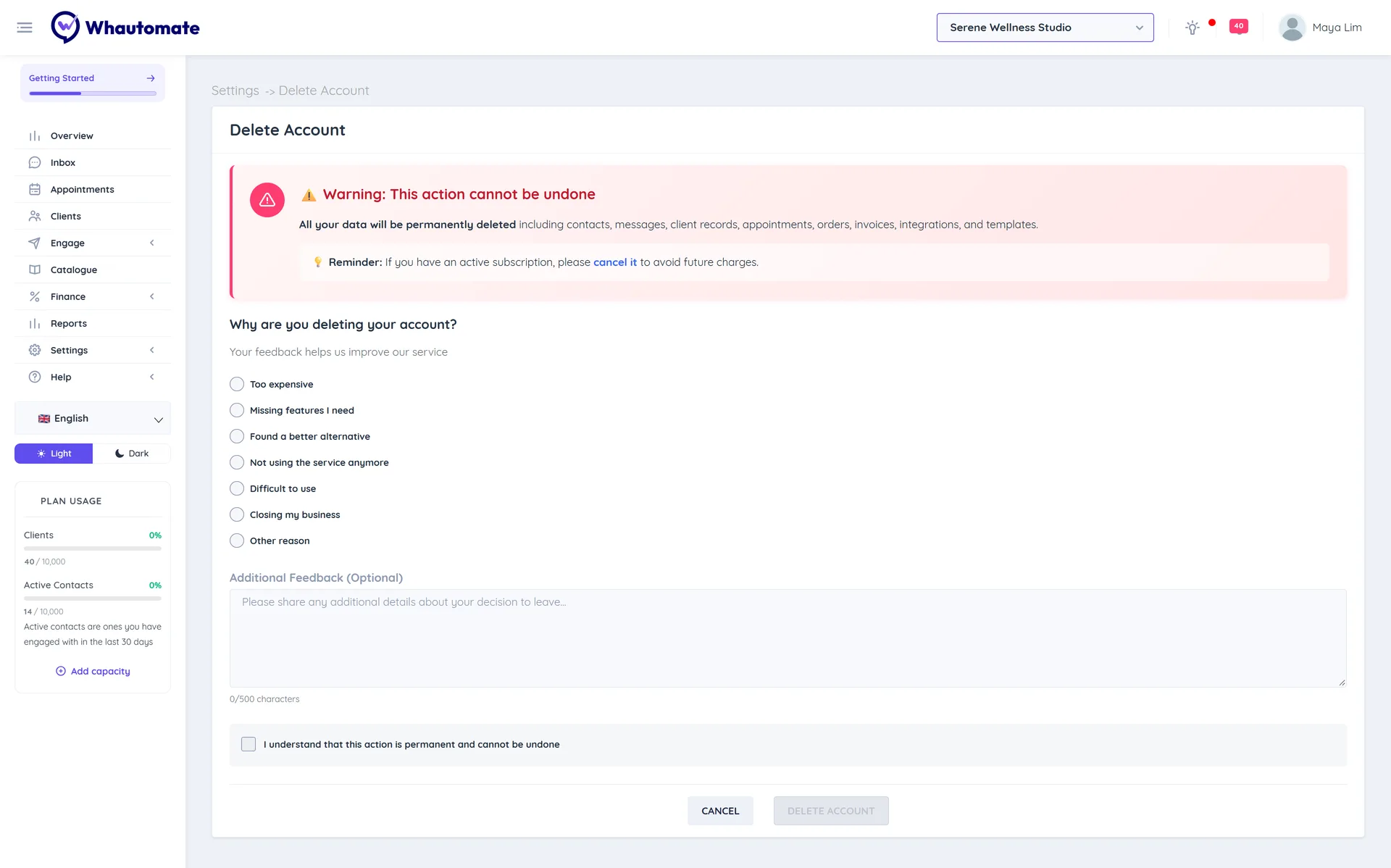
Deleting your account permanently deletes all your data, including contacts, messages, client records, appointments, orders, invoices, integrations and templates, in every workspace. This cannot be undone.
Only need to switch off one workspace?
Deactivate the workspace instead. Its data is kept and you can reactivate it at any time.
Permissions
Only the account Owner can delete the account. The option is under Settings > Account & Team.
Before you delete
Deleting your account does not cancel your subscription. If you have an active subscription, cancel it first to avoid future charges.
If you want to keep any records, export them first. See Data Exports.
Steps
- Go to Settings, and under Account & Team click Delete Account.
- Under Why are you deleting your account?, choose a reason. You can add more detail under Additional Feedback (Optional).
- Tick I understand that this action is permanent and cannot be undone.
- Click Delete Account.
- Enter your password and click Delete Account again.
What happens next
- Every team member is signed out straight away, and your messaging channels are switched off.
- Your data is scheduled for permanent deletion. The account owners receive an email confirming the deletion.
If you are leaving because something is not working for you, please talk to us first at support@whautomate.com. We would love to help.